

Billing - How to Create a “Prevention” Invoice
Last updated: Aug 12, 2026
89
views

To create an invoice for Prevention or Prophylaxis, the invoice must contain the appropriate Cause and be sent directly to the patient.
Invoice Type
Start by opening a new invoice with the following settings:
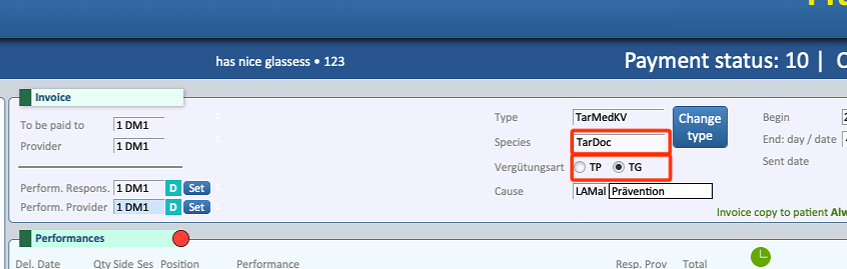
- Open an invoice with type Krankenheit/Maladie/Malattia (KV).
- Set the invoice as TG (Tiers Garant).
- At the top of the invoice, make sure that Species is set to TarDoc.
Cause
The Cause field is divided into two parts.
Set the fields as follows:
- Left side: Select Prophylaxis or Prevention.
- Right side: Select KVG (DEU) / LAMAL (FRA-ITA)
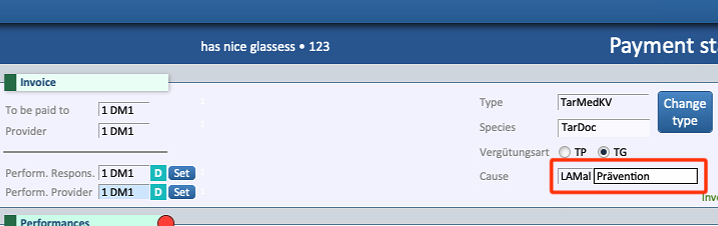
The resulting configuration should therefore be:
LaMal - Prevention or Prophylaxis
Important: Do not use “Check In” for Prevention or Prophylaxis invoices. The Cause must be set to Prevention or Prophylaxis only
Sending the Invoice
For Prevention or Prophylaxis invoices:
- The invoice must be set as TG (Tiers Garant).
- The invoice must be sent directly to the patient.
- The invoice must not be sent to the health insurance company.
Once all the settings have been verified, the invoice can be printed and sent directly to the patient.

