


 8
8
1. How to create an IVT invoice
IVT invoices must comply with a strict set of requirements to ensure they are accepted by medical insurance providers.
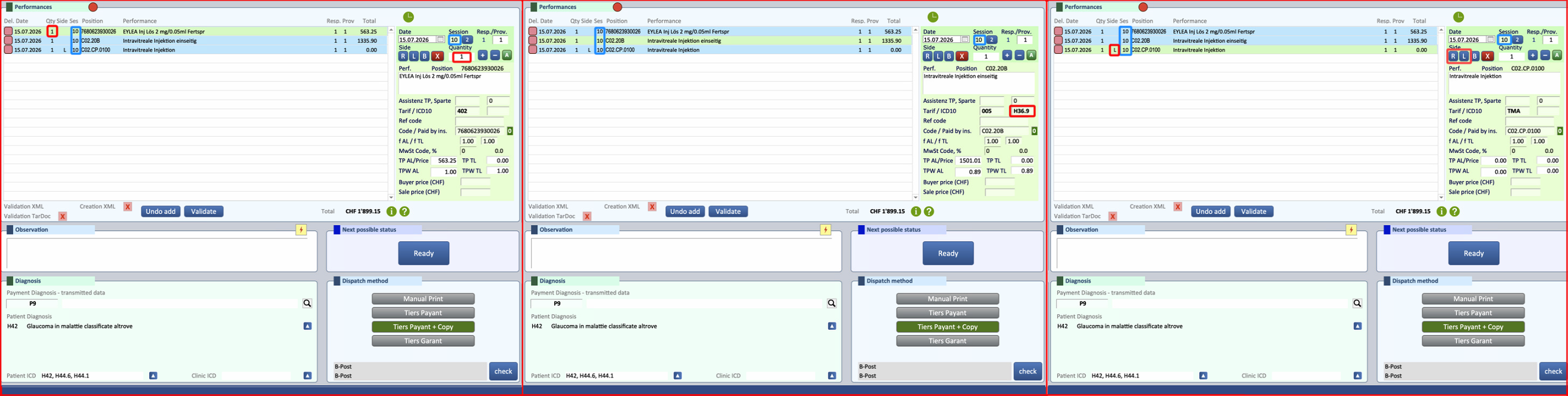
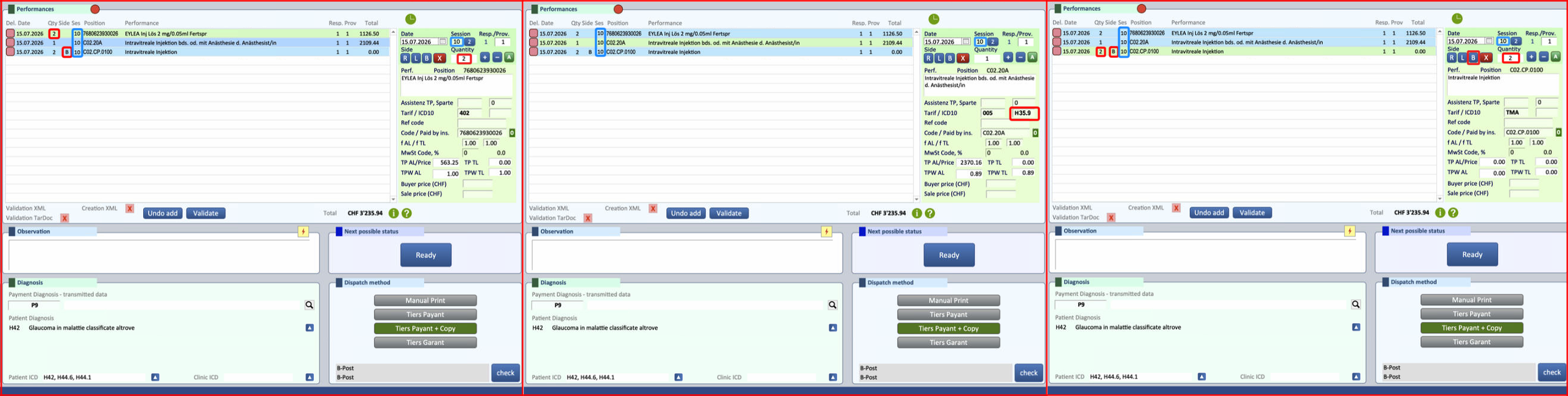
Important to note is that all positions of the flat rate must use the session number 10.
To create a compliant IVT invoice, follow the steps below:
- Main Position
- TarDoc Unilateral Code: C02.20B
- TarDoc Bilateral Code: C02.20A
Details:
-
- Tarif Code: 005 (indicates the flat rate system).
- ICD-10: Must be entered in the diagnosis field adjacent to Tarif Code 005 while the invoice is in "Open" status
- Trigger
- TardDoc Code: C02.CP.0100
Details:
-
- Eye Position: Select L (Left) or R (Right) for unilateral, and B for bilateral.
- Quantity: 1 for unilateral, 2 for bilateral
- Medication
Details:
-
- Tarif Code: 402.
Billing Note:
- All positions for the flat rate need to be in Session number 10
- The drug will initially appear with its list price during compilation, but it will subsequently be zeroed out during the submission phase, as the price of the drug is included within the flat-rate system.
- Example of a Unilateral IVT Invoice with all key fields highlighted. The same invoice is shown with annotations identifying the different sections and the information that must be provided.
- Example of a Bilateral IVT Invoice with all key fields highlighted. The same invoice is shown with annotations identifying the different sections and the information that must be provided.
⚠ ATTENTION!
- The ICD-10 code used in these examples are for illustrative purposes only. Be sure to enter the ICD-10 code that accurately reflects the patient's specific condition.
- The medication shown in these examples may be replaced with any other IVT medication, provided that the correct quantity is specified (1 for unilateral treatment, 2 for bilateral treatment). The remaining position will be the same
IMPORTANT SOURCES:
- ICD-10 Codes specific for the eyes
- LKAAT pages for the codes C02.20B, C02.20A and C02.CP.0100
2. How to create an IVT Button
The button configuration must follow the same guidelines as the invoice. For this reason, please refer to the previous section for the complete instructions.
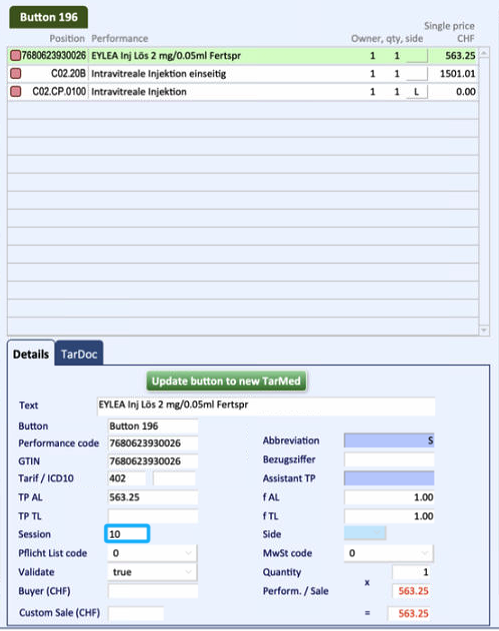
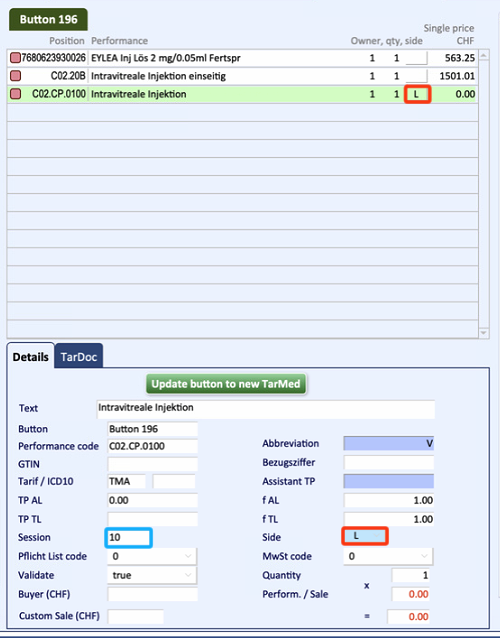
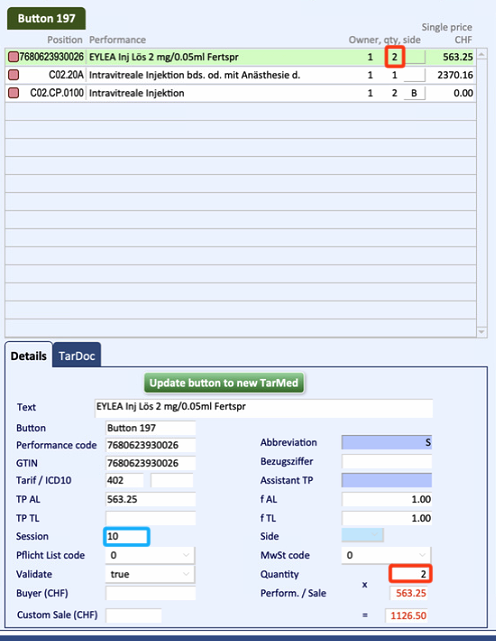
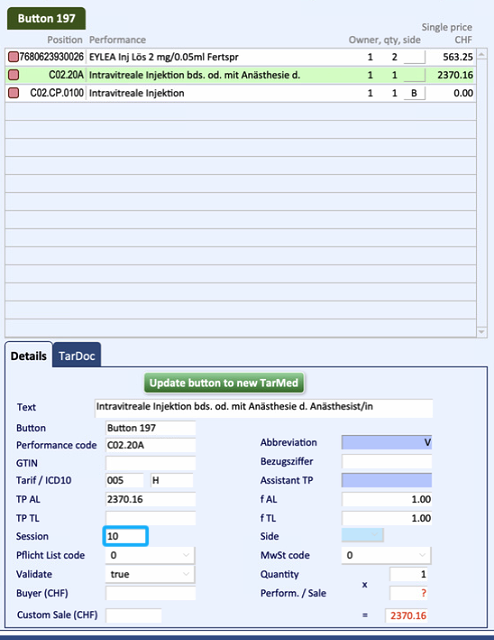
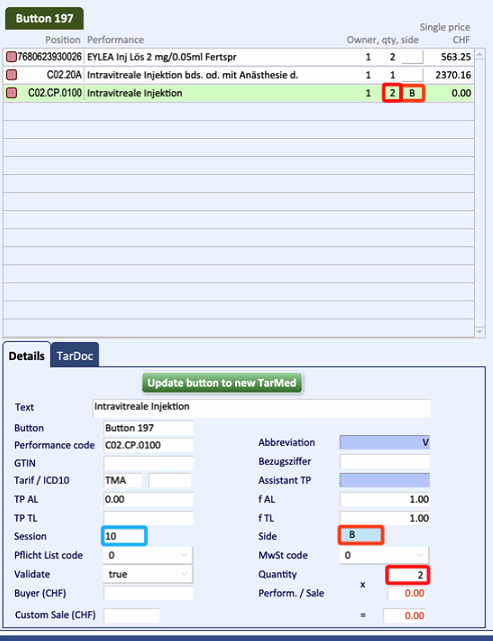
Below is an example of the button configuration for Eylea 2 mg, including both unilateral and bilateral setups.
Important to note is that all positions related to the flat rate, must be in session 10
- Example for unilateral button setup
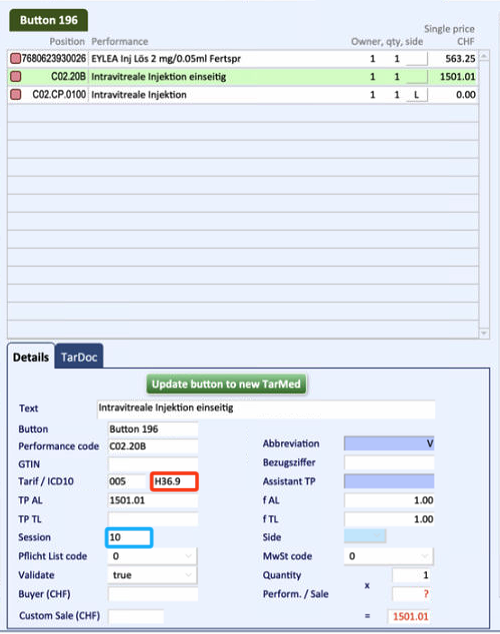
- Example for bilateral button setup
⚠ ATTENTION!
- The ICD-10 code used in these examples are for illustrative purposes only. Be sure to enter the ICD-10 code that accurately reflects the patient's specific condition.
- The medication shown in these examples may be replaced with any other IVT medication, provided that the correct quantity is specified (1 for unilateral treatment, 2 for bilateral treatment). The remaining position will be the same
3. Important Info
IMPORTANT SOURCES:
- ICD-10 Codes specific for ophtalmolofy
- LKAAT pages for the codes C02.20B, C02.20A and C02.CP.0100
IMPORTANT LINKS:
- Official Example for a flat rate: German, French
- Additional Flat Rate Information (point 6, page 6)
ADDITIONAL GUIDES:

